RestAPI
从 19.5.10 版本起,pyDAL 包含一个名为 RestAPI 的 restful API [CIT0801] 。它的灵感来自 GraphQL [CIT0802] ,虽然由于功能较弱,它们并不完全相同,但 RestAPI 符合 py4web 的精神,因为它更实用、更易于使用。
与 GraphQL 一样,RestAPI 允许客户端使用 GET 方法查询信息,并允许指定有关响应格式的一些详细信息(要遵循哪些引用,以及如何对数据进行非规范化)。与 GraphQL 不同之处,它允许服务器指定策略并限制允许哪些查询和不允许哪些查询。可以根据用户和服务器的状态对每个请求进行动态评估。
顾名思义,RestAPI 允许所有标准方法:GET、POST、PUT 和 DELETE 。对于单个表和单个字段,可以根据策略启用或禁用它们中的任意一个。
备注
由于这是一项新功能,技术规范可能会发生变化。
在下面的示例中,我们假设有一个叫做 “superheroes” 的简单应用:
# in superheroes/__init__.py
import os
from py4web import action, request, Field, DAL
from pydal.restapi import RestAPI, Policy

# database definition
DB_FOLDER = os.path.join(os.path.dirname(__file__), 'databases')
if not os.path.isdir(DB_FOLDER):
    os.mkdir(DB_FOLDER)
db = DAL('sqlite://storage.sqlite', folder=DB_FOLDER)
db.define_table(
    'person',
    Field('name'),
    Field('job'))
db.define_table(
    'superhero',
    Field('name'),
    Field('real_identity', 'reference person'))
db.define_table(
    'superpower',
    Field('description'))
db.define_table(
    'tag',
    Field('superhero', 'reference superhero'),
    Field('superpower', 'reference superpower'),
    Field('strength', 'integer'))

# add example entries in db
if not db(db.person).count():
    db.person.insert(name='Clark Kent', job='Journalist')
    db.person.insert(name='Peter Park', job='Photographer')
    db.person.insert(name='Bruce Wayne', job='CEO')
    db.superhero.insert(name='Superman', real_identity=1)
    db.superhero.insert(name='Spiderman', real_identity=2)
    db.superhero.insert(name='Batman', real_identity=3)
    db.superpower.insert(description='Flight')
    db.superpower.insert(description='Strength')
    db.superpower.insert(description='Speed')
    db.superpower.insert(description='Durability')
    db.tag.insert(superhero=1, superpower=1, strength=100)
    db.tag.insert(superhero=1, superpower=2, strength=100)
    db.tag.insert(superhero=1, superpower=3, strength=100)
    db.tag.insert(superhero=1, superpower=4, strength=100)
    db.tag.insert(superhero=2, superpower=2, strength=50)
    db.tag.insert(superhero=2, superpower=3, strength=75)
    db.tag.insert(superhero=2, superpower=4, strength=10)
    db.tag.insert(superhero=3, superpower=2, strength=80)
    db.tag.insert(superhero=3, superpower=3, strength=20)
    db.tag.insert(superhero=3, superpower=4, strength=70)
    db.commit()

# policy definitions
policy = Policy()
policy.set('superhero', 'GET', authorize=True, allowed_patterns=['*'])
policy.set('*', 'GET', authorize=True, allowed_patterns=['*'])

# for security reasons we disabled here all methods but GET at the policy level,
# to enable any of them just set authorize = True
policy.set('*', 'PUT', authorize=False)
policy.set('*', 'POST', authorize=False)
policy.set('*', 'DELETE', authorize=False)

@action('api/<tablename>/', method = ['GET', 'POST'])
@action('api/<tablename>/<rec_id>', method = ['GET', 'PUT', 'DELETE'])
@action.uses(db)
def api(tablename, rec_id=None):
    return RestAPI(db, policy)(request.method,
                            tablename,
                            rec_id,
                            request.GET,
                            request.POST
                            )

@action("index")
def index():
    return "RestAPI example"
RestAPI 的 policy 和 action
该策略是针对每个表(或 * 代表的所有表)和每个方法的。 authorize 可以是 True(允许)、False(拒绝),也可以是返回 True/False 的带有签名的函数( (method, tablename, record_id, get_vars, post_vars))。对于 GET 策略,可以指定一个允许的查询模式列表( * 代表所有模式)。查询模式将与查询字符串中的键进行匹配。
上述 action 公开了:
/superheroes/api/{tablename}
/superheroes/api/{tablename}/{rec_id}
结果可以直接用浏览器看到,呈现为 JSON 格式。作为示例,让我们看一下 person 表:
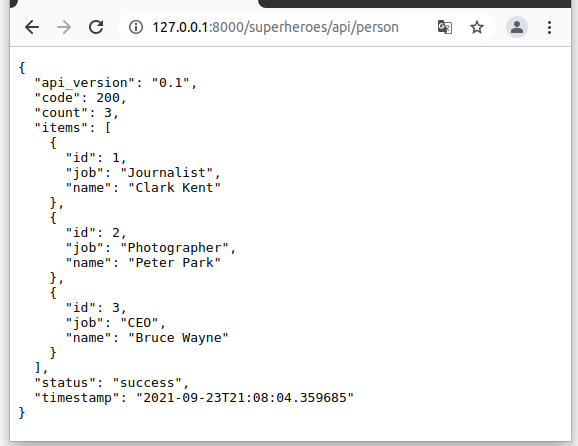
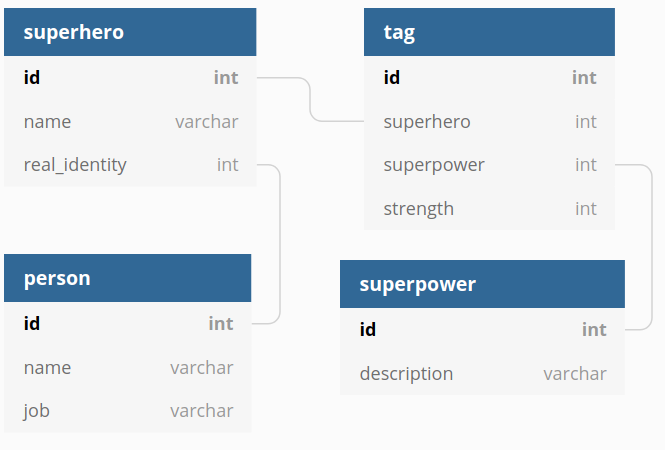
superhero 的数据库的示意图应该可以帮助你理解代码:
备注
请记住, request.POST 只包含使用 regular HTML-form 或 JavaScript FormData 对象发送的表单数据。
RestAPI GET
一般查询的格式为 {something}.eq=value ,其中 eq= 表示“相等”, gt= 表示“大于”,以此类推。表达式前面可以加上 not.
{something} 可以是:
表中的字段名称的查询,示例如下:
所有被称为 “Superman” 的超级英雄
/superheroes/api/superhero?name.eq=Superman
被查询的表引用的表的字段的名称,示例如下:
所有真实身份是 “Clark Kent” 的超级英雄
/superheroes/api/superhero?real_identity.name.eq=Clark Kent
引用被查询表的字段的名称,如下所示
所有拥有超级力量大于 90 的超级英雄
/superheroes/api/superhero?superhero.tag.strength.gt=90
(这里的
tag是链接表的名称,前面的superhero是引用所选表的字段的名称,strength是用于过滤的字段名称)由多对多链接表引用的表字段,如下所示:
所有拥有飞行能力的超级英雄
/superheroes/api/superhero?superhero.tag.superpower.description.eq=Flight
提示
理解上述语法的关键是将其解读为:
当所述表 tag 的 superpower 字段指向的表中 description 字段等于 “Flight” 时, “查询记录表 tag 中的 superhero 字段引用的 superhero 表中的记录。”
该查询允许使用其他修饰符,例如:
@offset=10
@limit=10
@order=name
@model=true
@lookup=real_identity
前三个是显而易见的。 @model 返回数据库模型的 JSON 描述。 @lookup 对链接字段进行非规范化处理。
RestAPI 实例
以下是一些实际例子:
URL:
/superheroes/api/superhero
输出:
{
    "count": 3,
    "status": "success",
    "code": 200,
    "items": [
        {
            "real_identity": 1,
            "name": "Superman",
            "id": 1
        },
        {
            "real_identity": 2,
            "name": "Spiderman",
            "id": 2
        },
        {
            "real_identity": 3,
            "name": "Batman",
            "id": 3
        }
    ],
    "timestamp": "2019-05-19T05:38:00.132635",
    "api_version": "0.1"
}
URL:
/superheroes/api/superhero?@model=true
输出:
{
    "count": 3,
    "status": "success",
    "code": 200,
    "items": [
        {
            "real_identity": 1,
            "name": "Superman",
            "id": 1
        },
        {
            "real_identity": 2,
            "name": "Spiderman",
            "id": 2
        },
        {
            "real_identity": 3,
            "name": "Batman",
            "id": 3
        }
    ],
    "timestamp": "2021-01-04T07:03:38.466030",
    "model": [
        {
            "regex": "[1-9]\\d*",
            "name": "id",
            "default": null,
            "required": false,
            "label": "Id",
            "post_writable": true,
            "referenced_by": [
                "tag.superhero"
            ],
            "unique": false,
            "type": "id",
            "options": null,
            "put_writable": true
        },
        {
            "regex": null,
            "name": "name",
            "default": null,
            "required": false,
            "label": "Name",
            "post_writable": true,
            "unique": false,
            "type": "string",
            "options": null,
            "put_writable": true
        },
        {
            "regex": null,
            "name": "real_identity",
            "default": null,
            "required": false,
            "label": "Real Identity",
            "post_writable": true,
            "references": "person",
            "unique": false,
            "type": "reference",
            "options": null,
            "put_writable": true
        }
    ],
    "api_version": "0.1"
}
URL:
/superheroes/api/superhero?@lookup=real_identity
输出:
{
    "count": 3,
    "status": "success",
    "code": 200,
    "items": [
        {
            "real_identity": {
                "name": "Clark Kent",
                "job": "Journalist",
                "id": 1
            },
            "name": "Superman",
            "id": 1
        },
        {
            "real_identity": {
                "name": "Peter Park",
                "job": "Photographer",
                "id": 2
            },
            "name": "Spiderman",
            "id": 2
        },
        {
            "real_identity": {
                "name": "Bruce Wayne",
                "job": "CEO",
                "id": 3
            },
            "name": "Batman",
            "id": 3
        }
    ],
    "timestamp": "2019-05-19T05:38:00.178974",
    "api_version": "0.1"
}
URL:
/superheroes/api/superhero?@lookup=identity:real_identity
(将 real_identity 反规范化并重命名为 identity )
输出:
{
    "count": 3,
    "status": "success",
    "code": 200,
    "items": [
        {
            "real_identity": 1,
            "name": "Superman",
            "id": 1,
            "identity": {
                "name": "Clark Kent",
                "job": "Journalist",
                "id": 1
            }
        },
        {
            "real_identity": 2,
            "name": "Spiderman",
            "id": 2,
            "identity": {
                "name": "Peter Park",
                "job": "Photographer",
                "id": 2
            }
        },
        {
            "real_identity": 3,
            "name": "Batman",
            "id": 3,
            "identity": {
                "name": "Bruce Wayne",
                "job": "CEO",
                "id": 3
            }
        }
    ],
    "timestamp": "2019-05-19T05:38:00.123218",
    "api_version": "0.1"
}
URL:
/superheroes/api/superhero?@lookup=identity!:real_identity[name,job]
(对 real_identity 进行非规范化 [但仅限于字段 name 和 job],用 identity 前缀折叠)
输出:
{
    "count": 3,
    "status": "success",
    "code": 200,
    "items": [
        {
            "name": "Superman",
            "identity.job": "Journalist",
            "identity.name": "Clark Kent",
            "id": 1
        },
        {
            "name": "Spiderman",
            "identity.job": "Photographer",
            "identity.name": "Peter Park",
            "id": 2
        },
        {
            "name": "Batman",
            "identity.job": "CEO",
            "identity.name": "Bruce Wayne",
            "id": 3
        }
    ],
    "timestamp": "2021-01-04T07:03:38.559918",
    "api_version": "0.1"
}
URL:
/superheroes/api/superhero?@lookup=superhero.tag
输出:
{
    "count": 3,
    "status": "success",
    "code": 200,
    "items": [
        {
            "real_identity": 1,
            "name": "Superman",
            "superhero.tag": [
                {
                    "strength": 100,
                    "superhero": 1,
                    "id": 1,
                    "superpower": 1
                },
                {
                    "strength": 100,
                    "superhero": 1,
                    "id": 2,
                    "superpower": 2
                },
                {
                    "strength": 100,
                    "superhero": 1,
                    "id": 3,
                    "superpower": 3
                },
                {
                    "strength": 100,
                    "superhero": 1,
                    "id": 4,
                    "superpower": 4
                }
            ],
            "id": 1
        },
        {
            "real_identity": 2,
            "name": "Spiderman",
            "superhero.tag": [
                {
                    "strength": 50,
                    "superhero": 2,
                    "id": 5,
                    "superpower": 2
                },
                {
                    "strength": 75,
                    "superhero": 2,
                    "id": 6,
                    "superpower": 3
                },
                {
                    "strength": 10,
                    "superhero": 2,
                    "id": 7,
                    "superpower": 4
                }
            ],
            "id": 2
        },
        {
            "real_identity": 3,
            "name": "Batman",
            "superhero.tag": [
                {
                    "strength": 80,
                    "superhero": 3,
                    "id": 8,
                    "superpower": 2
                },
                {
                    "strength": 20,
                    "superhero": 3,
                    "id": 9,
                    "superpower": 3
                },
                {
                    "strength": 70,
                    "superhero": 3,
                    "id": 10,
                    "superpower": 4
                }
            ],
            "id": 3
        }
    ],
    "timestamp": "2019-05-19T05:38:00.201988",
    "api_version": "0.1"
}
URL:
/superheroes/api/superhero?@lookup=superhero.tag.superpower
输出:
{
    "count": 3,
    "status": "success",
    "code": 200,
    "items": [
        {
            "real_identity": 1,
            "name": "Superman",
            "superhero.tag.superpower": [
                {
                    "strength": 100,
                    "superhero": 1,
                    "id": 1,
                    "superpower": {
                        "id": 1,
                        "description": "Flight"
                    }
                },
                {
                    "strength": 100,
                    "superhero": 1,
                    "id": 2,
                    "superpower": {
                        "id": 2,
                        "description": "Strength"
                    }
                },
                {
                    "strength": 100,
                    "superhero": 1,
                    "id": 3,
                    "superpower": {
                        "id": 3,
                        "description": "Speed"
                    }
                },
                {
                    "strength": 100,
                    "superhero": 1,
                    "id": 4,
                    "superpower": {
                        "id": 4,
                        "description": "Durability"
                    }
                }
            ],
            "id": 1
        },
        {
            "real_identity": 2,
            "name": "Spiderman",
            "superhero.tag.superpower": [
                {
                    "strength": 50,
                    "superhero": 2,
                    "id": 5,
                    "superpower": {
                        "id": 2,
                        "description": "Strength"
                    }
                },
                {
                    "strength": 75,
                    "superhero": 2,
                    "id": 6,
                    "superpower": {
                        "id": 3,
                        "description": "Speed"
                    }
                },
                {
                    "strength": 10,
                    "superhero": 2,
                    "id": 7,
                    "superpower": {
                        "id": 4,
                        "description": "Durability"
                    }
                }
            ],
            "id": 2
        },
        {
            "real_identity": 3,
            "name": "Batman",
            "superhero.tag.superpower": [
                {
                    "strength": 80,
                    "superhero": 3,
                    "id": 8,
                    "superpower": {
                        "id": 2,
                        "description": "Strength"
                    }
                },
                {
                    "strength": 20,
                    "superhero": 3,
                    "id": 9,
                    "superpower": {
                        "id": 3,
                        "description": "Speed"
                    }
                },
                {
                    "strength": 70,
                    "superhero": 3,
                    "id": 10,
                    "superpower": {
                        "id": 4,
                        "description": "Durability"
                    }
                }
            ],
            "id": 3
        }
    ],
    "timestamp": "2019-05-19T05:38:00.322494",
    "api_version": "0.1"
}
URL (这是一行,为了可读性而拆分):
/superheroes/api/superhero?
@lookup=powers:superhero.tag[strength].superpower[description]
输出:
{
    "count": 3,
    "status": "success",
    "code": 200,
    "items": [
        {
            "real_identity": 1,
            "name": "Superman",
            "powers": [
                {
                    "strength": 100,
                    "superpower": {
                        "description": "Flight"
                    }
                },
                {
                    "strength": 100,
                    "superpower": {
                        "description": "Strength"
                    }
                },
                {
                    "strength": 100,
                    "superpower": {
                        "description": "Speed"
                    }
                },
                {
                    "strength": 100,
                    "superpower": {
                        "description": "Durability"
                    }
                }
            ],
            "id": 1
        },
        {
            "real_identity": 2,
            "name": "Spiderman",
            "powers": [
                {
                    "strength": 50,
                    "superpower": {
                        "description": "Strength"
                    }
                },
                {
                    "strength": 75,
                    "superpower": {
                        "description": "Speed"
                    }
                },
                {
                    "strength": 10,
                    "superpower": {
                        "description": "Durability"
                    }
                }
            ],
            "id": 2
        },
        {
            "real_identity": 3,
            "name": "Batman",
            "powers": [
                {
                    "strength": 80,
                    "superpower": {
                        "description": "Strength"
                    }
                },
                {
                    "strength": 20,
                    "superpower": {
                        "description": "Speed"
                    }
                },
                {
                    "strength": 70,
                    "superpower": {
                        "description": "Durability"
                    }
                }
            ],
            "id": 3
        }
    ],
    "timestamp": "2019-05-19T05:38:00.309903",
    "api_version": "0.1"
}
URL (这是一行,为了可读性而拆分):
/superheroes/api/superhero?
@lookup=powers!:superhero.tag[strength].superpower[description]
输出:
{
    "count": 3,
    "status": "success",
    "code": 200,
    "items": [
        {
            "real_identity": 1,
            "name": "Superman",
            "powers": [
                {
                    "strength": 100,
                    "description": "Flight"
                },
                {
                    "strength": 100,
                    "description": "Strength"
                },
                {
                    "strength": 100,
                    "description": "Speed"
                },
                {
                    "strength": 100,
                    "description": "Durability"
                }
            ],
            "id": 1
        },
        {
            "real_identity": 2,
            "name": "Spiderman",
            "powers": [
                {
                    "strength": 50,
                    "description": "Strength"
                },
                {
                    "strength": 75,
                    "description": "Speed"
                },
                {
                    "strength": 10,
                    "description": "Durability"
                }
            ],
            "id": 2
        },
        {
            "real_identity": 3,
            "name": "Batman",
            "powers": [
                {
                    "strength": 80,
                    "description": "Strength"
                },
                {
                    "strength": 20,
                    "description": "Speed"
                },
                {
                    "strength": 70,
                    "description": "Durability"
                }
            ],
            "id": 3
        }
    ],
    "timestamp": "2019-05-19T05:38:00.355181",
    "api_version": "0.1"
}
URL (这是一行,为了可读性而拆分):
/superheroes/api/superhero?
@lookup=powers!:superhero.tag[strength].superpower[description],
identity!:real_identity[name]
输出:
{
    "count": 3,
    "status": "success",
    "code": 200,
    "items": [
        {
            "name": "Superman",
            "identity.name": "Clark Kent",
            "powers": [
                {
                    "strength": 100,
                    "description": "Flight"
                },
                {
                    "strength": 100,
                    "description": "Strength"
                },
                {
                    "strength": 100,
                    "description": "Speed"
                },
                {
                    "strength": 100,
                    "description": "Durability"
                }
            ],
            "id": 1
        },
        {
            "name": "Spiderman",
            "identity.name": "Peter Park",
            "powers": [
                {
                    "strength": 50,
                    "description": "Strength"
                },
                {
                    "strength": 75,
                    "description": "Speed"
                },
                {
                    "strength": 10,
                    "description": "Durability"
                }
            ],
            "id": 2
        },
        {
            "name": "Batman",
            "identity.name": "Bruce Wayne",
            "powers": [
                {
                    "strength": 80,
                    "description": "Strength"
                },
                {
                    "strength": 20,
                    "description": "Speed"
                },
                {
                    "strength": 70,
                    "description": "Durability"
                }
            ],
            "id": 3
        }
    ],
    "timestamp": "2021-01-04T07:31:34.974953",
    "api_version": "0.1"
}
URL:
/superheroes/api/superhero?name.eq=Superman
输出:
{
    "count": 1,
    "status": "success",
    "code": 200,
    "items": [
        {
            "real_identity": 1,
            "name": "Superman",
            "id": 1
        }
    ],
    "timestamp": "2019-05-19T05:38:00.405515",
    "api_version": "0.1"
}
URL:
/superheroes/api/superhero?real_identity.name.eq=Clark Kent
输出:
{
    "count": 1,
    "status": "success",
    "code": 200,
    "items": [
        {
            "real_identity": 1,
            "name": "Superman",
            "id": 1
        }
    ],
    "timestamp": "2019-05-19T05:38:00.366288",
    "api_version": "0.1"
}
URL:
/superheroes/api/superhero?not.real_identity.name.eq=Clark Kent
输出:
{
    "count": 2,
    "status": "success",
    "code": 200,
    "items": [
        {
            "real_identity": 2,
            "name": "Spiderman",
            "id": 2
        },
        {
            "real_identity": 3,
            "name": "Batman",
            "id": 3
        }
    ],
    "timestamp": "2019-05-19T05:38:00.451907",
    "api_version": "0.1"
}
URL:
/superheroes/api/superhero?superhero.tag.superpower.description=Flight
输出:
{
    "count": 1,
    "status": "success",
    "code": 200,
    "items": [
        {
            "real_identity": 1,
            "name": "Superman",
            "id": 1
        }
    ],
    "timestamp": "2019-05-19T05:38:00.453020",
    "api_version": "0.1"
}
RestAPI 的响应
所有 RestAPI 响应都有以下字段:
- api_version:
RestAPI 的版本号
- timestamp:
ISO 8601 格式的日期时间(YYYY-MM-DDThh:mm:ss[.mmm]TZD)
- status:
RestAPI 状态(即 "success" 或 "error" )
- code:
HTTP 状态
其他可选字段包括:
- count:
匹配的总数量(不是返回的总数量),用于 GET
- items:
针对 GET 的响应数据项目
- errors:
通常是验证错误
- models:
通常 status != "success" 时,才有此项
- message:
有关错误的详细信息